
Microtrends List View
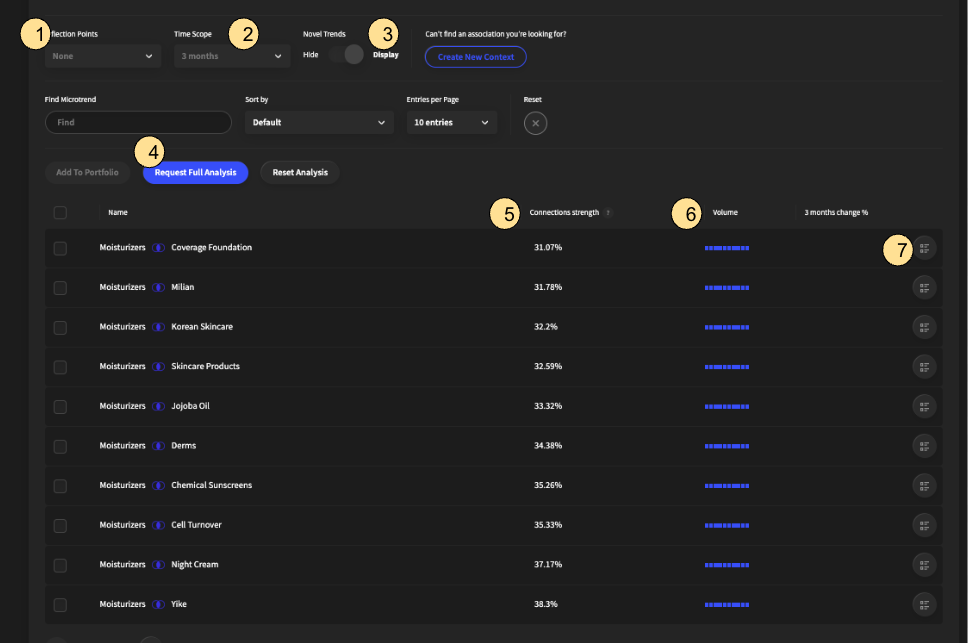
To view the microtrends in a list view, scroll beneath the context space visual. If you can not find an association you are looking for, you can select “Create new Context” to add your own association.
Inflection Points Filter on microtrend associations that have had inflection points triggered in the past two weeks
Time Scope (Change in association) Filter on the timeframe for the microtrend association’s growth rate
Novel Trends Either hide or display novel microtrend associations, i.e., microtrend associations with sparse data
Request Full Analysis (Reset Analysis) Rank all microtrend associations by growth rate. It takes 10 – 15 min for the ranking to be completed. You will receive an email notification when the microtrend association ranking is complete
Connection Strength The degree of similarity or interrelatedness between the pair of microtrends
Volume How frequently the two microtrends occur in the same context
Microtrend Snippet Displays Where the association is mentioned in either news articles or social media posts